Showing posts with label mysql. Show all posts

Monday, March 24, 2014

MySQL error code: 1175 during UPDATE in MySQL Workbench

It is look like that MySql run with safe-updates option. It mean you can't update or delete record without key (ex. primary key) on where clause.
Try use:
SET SQL_SAFE_UPDATES = 0;
or you can modify your query to follow the rule (use primary key on where clause).

Tuesday, February 25, 2014

MySQL Workbench – Error Code: 1175. You are using safe update mode

When you execute the update/delete request in MySQL workbench and you got the message error as:
You are using safe update mode and you tried to update a table without a WHERE that uses a KEY column
And in MySQL Workbench also mention how we solve this issue as well by following message:
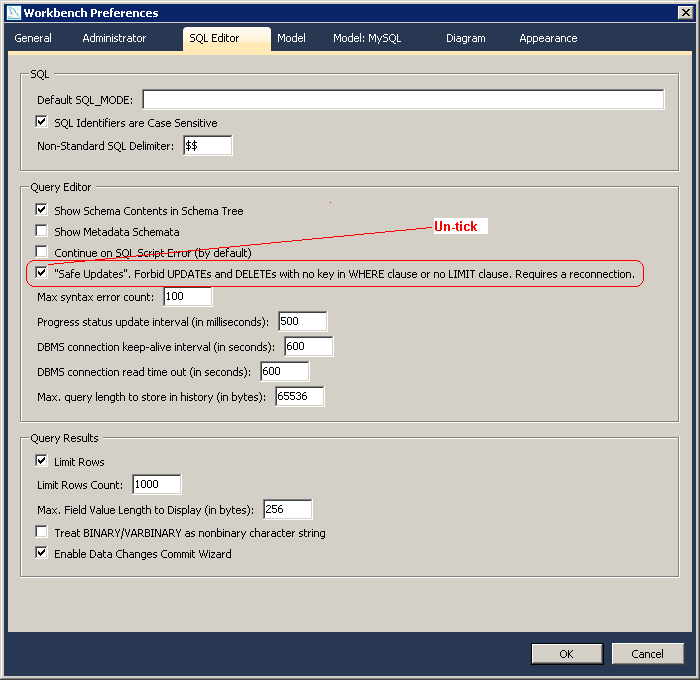
To disable safe mode, toggle the option in Preferences -> SQL Editor -> Query Editor and reconnect
Every found that kind of error when trying to update rows in MySQL? It’s because you tried to update a table without a WHERE that uses a KEY column. In my case, I don’t use even WHERE clause:
?
1
2
3
delete from order_detail;
 
delete from order;
Any way, the quick fix is to add SET SQL_SAFE_UPDATES=0; before your update/delete query.
?
1
2
3
4
SET SQL_SAFE_UPDATES=0;
delete from order_detail;
 
delete from order;
Or follow what MySQL Workbench mentioned as here:
To disable safe mode, toggle the option in Preferences -> SQL Editor -> Query Editor and reconnect
Here is the screenshot in MySQL Workbench 5.2.40 CE

Thursday, May 17, 2012

Can’t start Mysql error 1067

If you install under windows system, sometime it will suddenly unable to start the service,
i face this issue quite a few times already, finally i found a solution for it,
1st step check the error, under your installation path for mysql, check the data/mysql.err, it the error showing you something like this ..
050213 20:43:37 InnoDB: Starting shutdown…
050213 20:43:40 InnoDB: Shutdown completed; log sequence number 0 1051715
050213 20:43:40 [Note] C:Webmysqlbinmysqld-nt: Shutdown complete
this should be the log file having problem !
2nd step remove the ib_logfile0 or ib_logfile1 in the same folder
3rd step restart the mysql …
da da da … mysql service is running again

http://imknight.net/development/cant-start-mysql-error-1067/